Classification systems for getting organised

Introduction: why talk about classification systems?
It's easy to tell yourself you're "disorganised", and that mastering classification systems won't change a thing.
It starts in childhood, when we come up against other people's limits.
We leave our toys out, because their place is on the play mat, not on the shelves.
We don't know how to sort our books.
And yet, in most cases, our teachers had already taught us to tidy our lockers and to structure our ideas on paper (titles in red, subtitles in green, the divider in the right place… you probably remember).
Then, for some women, mental load sets in, or conditions that make decision-making, motor skills or the perception of time difficult.
Don't feel guilty.
In this article, I'll introduce several stable systems for organising your physical or digital spaces.
First, we'll look at methods that make room by clearing out the exhausting excess. Then we'll move on to classification systems proper.
The goals?
- Finding and labelling what you own,
- avoiding accumulation,
- and freeing up time for the things that really matter.
In my own experience, the problem isn't a lack of willpower, but the lack of a system that's clear and stable enough for our physical and digital spaces.
Why talk about organisation on this blog?
You're probably wondering what an article on organisation is doing on the blog of a translator specialising in culture and literature.
In my article Out of step: growing up gifted and neurodivergent, I explain that since childhood I've felt crushed by the weight of my mental load, that I struggle with sleep and that I find it very hard to balance my private life with my studies and my work.
In 2020, I made the most of the boom in online personal-development content to do a huge amount of work on myself. Along the way, I earned a certification as an NLP (neuro-linguistic programming) coach, discovered the KonMari method and joined Notion Mastery, Marie Poulin's course on building Notion workspaces inspired by the principles of permaculture.
Since then, I've earned my four Notion badges (Essentials, Workflows, Advanced, AI) and studied and implemented other classification and organisation systems, until I developed my own.
I'll be telling you more about it here, on this blog.
The hardest spaces to manage
For me, the spaces that get stuck the most are the ones that refill constantly.
For example:
- the kitchen (a mess three times a day)
- the Downloads or Screenshots folder
- the email inbox
- the inbox in Notion (that is, the capture database where notes and ideas pile up, whatever you call it)
→ These are places we fill and empty continuously. To avoid accumulation, we need a daily processing habit that becomes so automatic that decision paralysis can't get in the way (something I struggle with; I'm certainly not the only one).
The signs of a clear system:
- You know immediately which category to put an item in
- You know where that category sits in your overall logic (in my case, a pyramid inspired by Maslow's hierarchy of needs)
Once you've absorbed your system's internal logic, you'll sort faster and feel less stressed.
So yes, it takes time, but it's truly liberating afterwards.
Let go of your guilt about tidying
I've always had a very traumatic relationship with tidying and with the space I take up in the world.
I remember a very embarrassing situation. In my first year of secondary school, our form tutor collected our ring binders to mark how organised we were. She had the unpleasant surprise of finding notes from subjects other than French stuffed behind the last divider.
Nothing serious. I was eight and a half at the time. It's normal not to have everything under control, and also to want to lighten your school bag by taking only one binder.
Yet she told me off and said I'd better get organised or I'd get a zero. Quite a challenge, when you know how easily the simplest tasks overwhelmed me.
Singled out in front of the whole class, I felt shame, and that sense of being dirty that the word disorganised sometimes triggers.
Over the years, I did what many people do: I internalised the criticism and tried concrete tips (different-coloured paper for each subject, visual cues, more obvious storage).
But I was still carrying certain traumas, and I found it hard to get rid of objects, clothes and outdated magazines. It probably runs in the family, since the cupboards in the family home hinted at hoarding tendencies. A strange anecdote: since we attract what we know and haven't yet let go of, I twice ended up living with people who hoarded, when I was renting a room or a studio in someone's home.
Since reflecting on this experience, I feel better. I've adopted routines such as reviews or resets (daily, weekly, monthly), and a classification system for my digital life that resembles the Johnny Decimal system and the Dewey Decimal Classification used in most libraries.
But first, you need to make room.
Before you classify: make room (minimalism and decluttering)
The minimalist philosophy
Very fashionable in the 2010s, no doubt as a reaction to overconsumption, minimalism isn't a classification system but a preliminary exercise for getting rid of the objects that clutter and weigh on us.
Once our space is cleared of the superfluous, sorting becomes easier.
It's also a philosophy that asks you to look at every area of your life and define workflows. For each item you keep, ask yourself: do I need it, what for, and how often?
My own minimalism isn't about aesthetics: I want to reduce upkeep (especially when furniture has to be moved to clean).
Taking notes matters too: if I capture an idea for a film to watch, I schedule the viewing in my calendar. In short, I don't overload myself with decisions, and I scroll less.
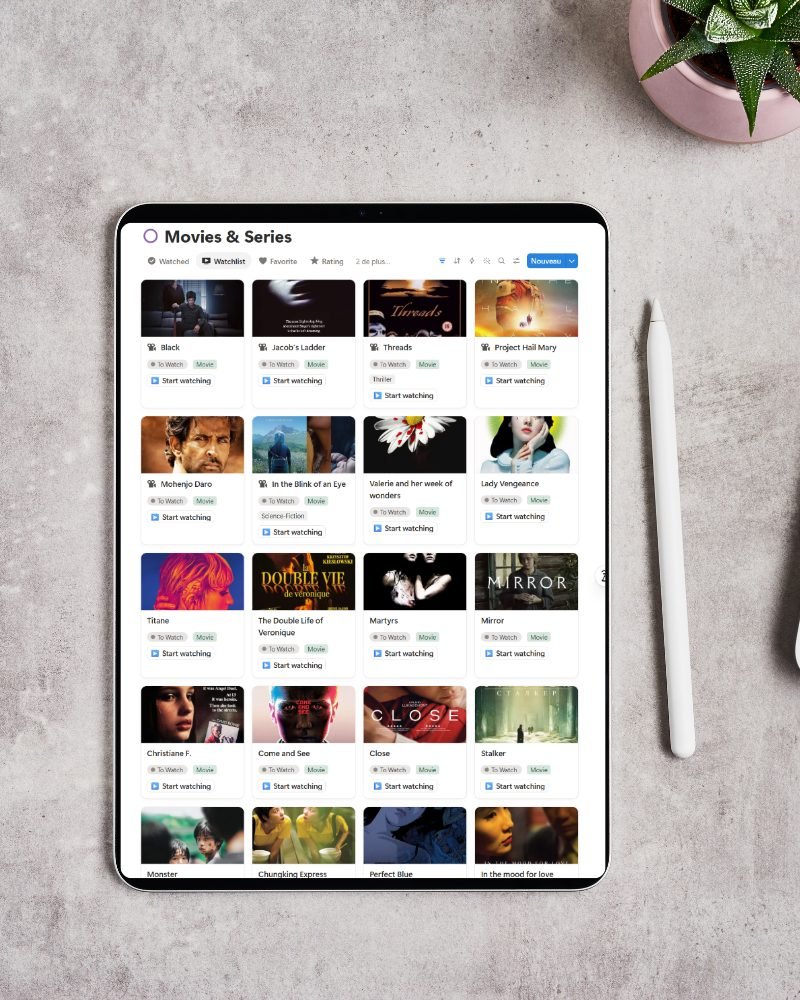
Between the ages of 19 and 29, I moved several times to a new city or country, sometimes taking very little with me. That freedom, which I also find when I settle into a hotel room, revives my creative energy.
I'm not encouraging you to get rid of everything or go on a retreat, but in his book Building a Second Brain, Tiago Forte suggests a radical approach to sorting your files: put everything in Archives and only bring back into Projects, Areas and Resources what really matters to you, right now.
The initial emptiness gets you moving again.
KonMari
I could spend hours talking about the KonMari method, especially The Life-Changing Manga of Tidying Up, the graphic novel based on Marie Kondo's book, because it makes it easier to see why this exercise matters – an exercise that ideally takes several weeks.
Why mention the KonMari method in an article about classification systems?
Simply because it requires you to sort all your possessions into five categories:
- clothes
- books
- papers
- komono (miscellaneous items)
- mementos and sentimental items.
To find out more, set aside time to watch at least one episode of the two series available on Netflix: Tidying Up with Marie Kondo (2019), in which she helps families declutter their homes, and Sparking Joy with Marie Kondo (2021), which focuses on organising work and business.
The participants come from all walks of life: a widow, a retired couple, a gay couple who want to seem more grown-up in their families' eyes, parents-to-be making room for the baby…
Watching real people react to decluttering is genuinely moving.
One striking fact: each person gets stuck on different categories. For the gay couple, for instance, one of them easily said goodbye to the clothes he didn't need, but found books far harder. The other struggled more with papers, including handwritten notes from his studies – real treasures for a writer.
What interests me in the KonMari method is the visualisation exercise you do beforehand.
That can be hard when you struggle with decision paralysis or find it difficult to see past the piles of stuff.
For me, the ideal KonMari life shows in simple gestures that become habits:
- emptying your bag every evening
- managing your wardrobe with a folding and hanging technique
- doing a clear-eyed, complete sort of all your books and all your papers.
What held me back most when I started sorting by category were the piles of notes, the books I'd never read and the lists of films I'd never have time to watch. I used to be buried under things to deal with, to the point of spreading myself too thin… or freezing.
If you'd like to explore tidying further, I recommend these two books:
- The Gentle Art of Swedish Death Cleaning by Margareta Magnusson
- The Art of Discarding by Nagisa Tatsumi
Classification systems: two approaches (Johnny Decimal & PARA)
Now let's look at two classification systems that work perfectly for your digital life.
Johnny Decimal
I've worked in libraries on several occasions: as a student assistant during my studies, helping set up a project when I was a French language assistant in Glasgow, then during my international volunteering service in Dale i Sunnfjord, in Norway.
Suffice it to say there was a time when the Dewey Decimal Classification held no secrets for me.
During my stay in Dale, I also worked at the NKD art centre on a project to catalogue the objects in the adjoining house. For that project, I developed my own classification system. I also talk about this love of inventories and of showcasing objects in my article A museography lesson from Glasgow.
JD is a very important system for me, because it inspired my own system, which I'll be telling you about here on the blog. I built Maslow's hierarchy into it, so I can easily see where my digital files belong, in order of importance for my personal and professional fulfilment.
Created by Johnny Noble, the Johnny Decimal system is a numerical classification method inspired by library systems such as Dewey.
The idea: give each item (resource, project, folder, file) a clear identity through a stable naming scheme.
The heart of Johnny Decimal fits in one sentence: build a deliberately limited structure (in tens), then number each part so you can find things quickly, everywhere.
The principle (explained with Billy bookcases – Scandinavia oblige)
Imagine you head to IKEA to buy 10 Billy bookcases. You don't have to use them all.
Line them up and give each one an area: a part of your life, a section of your business, a type of resource…
- You define 10 areas max, numbered in tens (10–19, 20–29, …).
- Each area is split into 10 categories max (11, 12, … for area 10–19).
- Each category holds its items under a unique ID (11.01, 11.02, …), up to 99 per category.
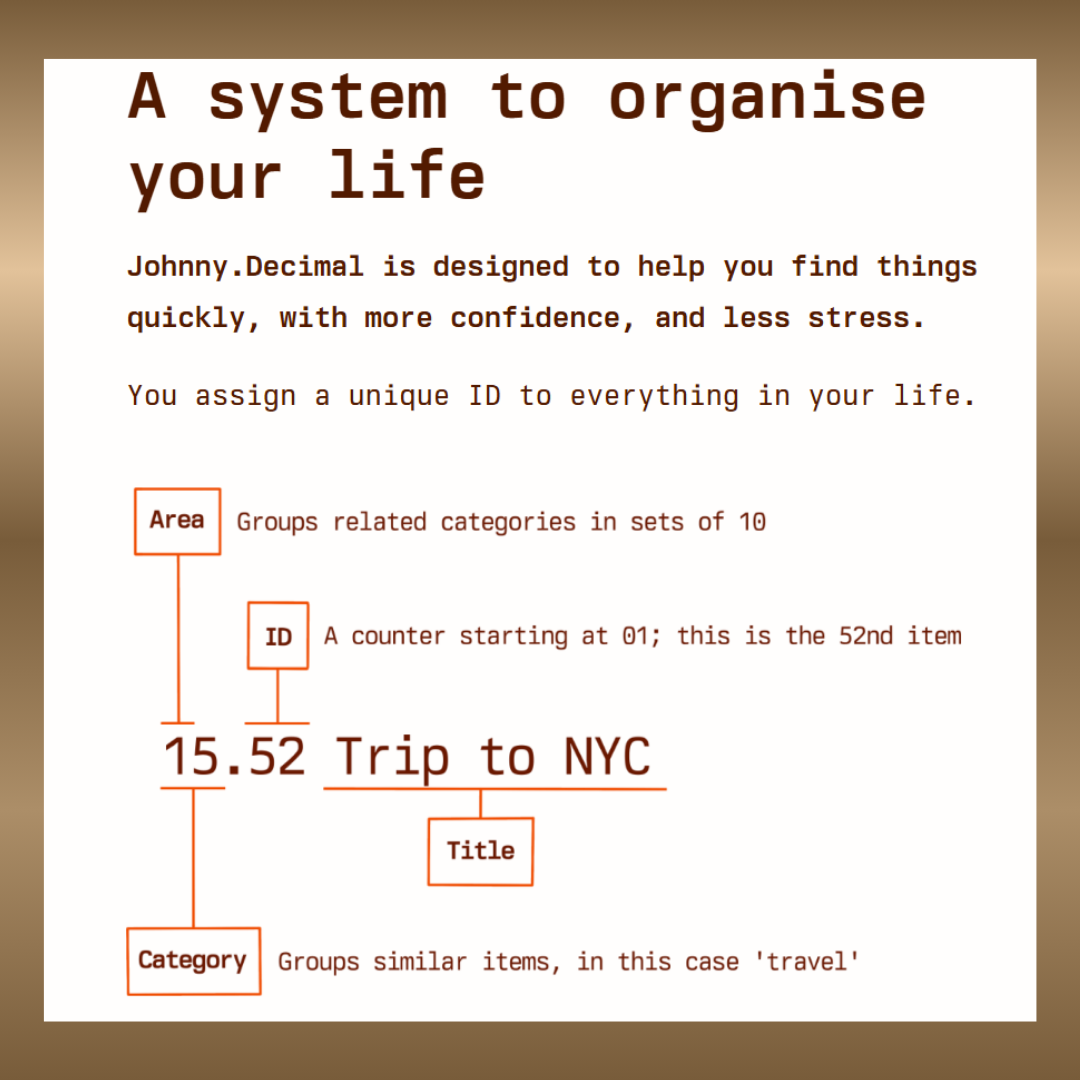
A practical example
Say area 30–39 is dedicated to your learning, and category 31 to languages. Your folders will then be:
- 31.01: language courses
- 31.02: dictionaries
- 31.03: audio resources
- etc.
Why it influenced my own system
Johnny Decimal genuinely shaped my own system: when I went back to Obsidian in 2025 to rethink my organisation, JD was the system I chose.
Thinking about a single naming scheme for all my digital files helped me take back control by clearly defining areas of interest across my business and my private life.
Here's a screenshot of my own Johnny Decimal system at the end of 2025, when I was in the middle of building my system.
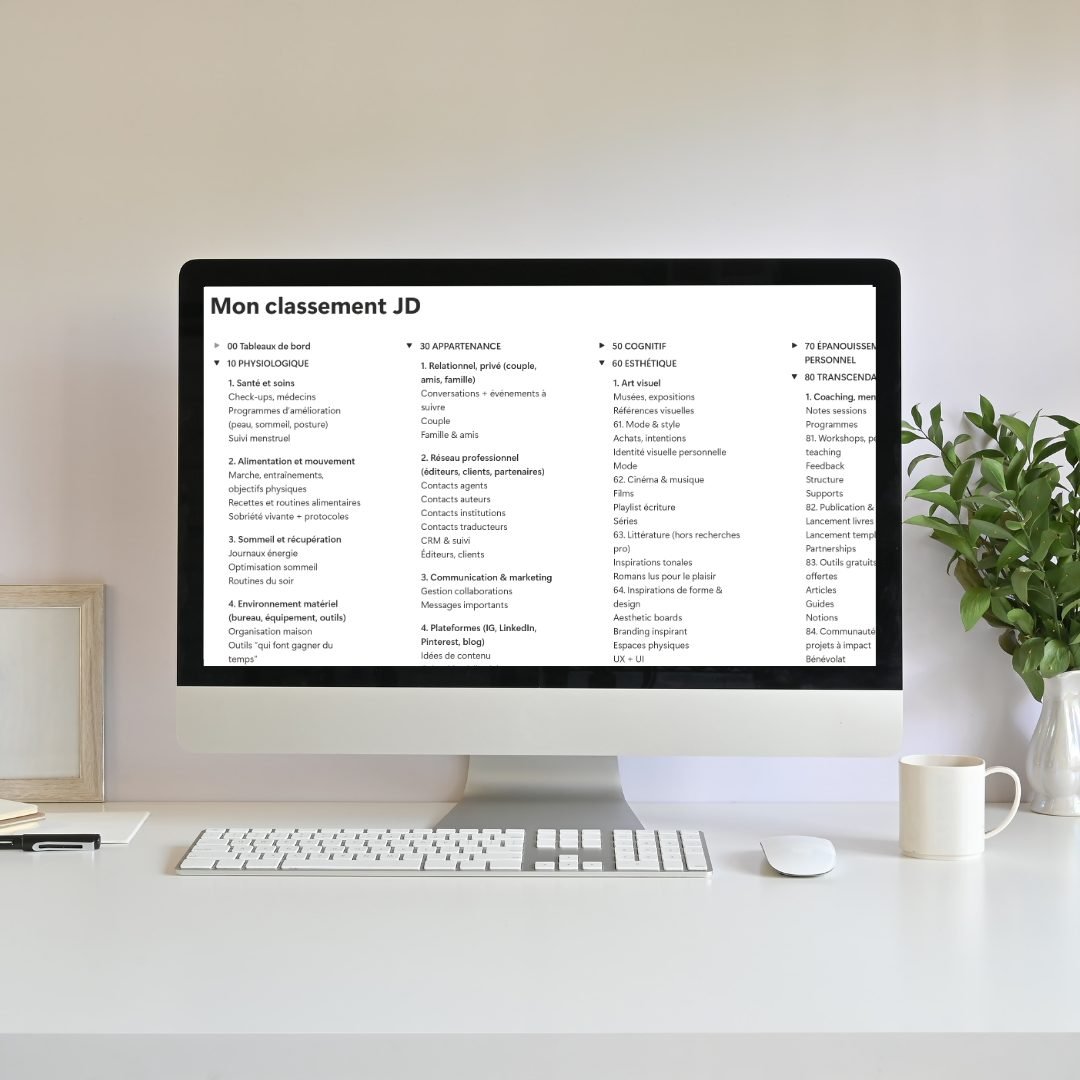
Creating categories for every area of your life gives you a holistic view of what you do, and will probably help you find the kind of alignment sometimes called ikigai.
In my case, the base of my pyramid represents non-negotiable needs (housing, money, food). Then you gradually climb towards self-transcendence.
The details get fine-tuned as needs arise.
So for every file, idea, screenshot or course I come across, I know exactly whether it belongs closer to the stabilising base or to the summit of self-transcendence.
Maximalist, but not limitless
JD can seem maximalist, but maximalist doesn't mean limitless. JD is a system that:
- deliberately limits its scope;
- demands real thinking (mapping) upfront: your life, your activities, your resources. That can be overwhelming if you haven't cleared the ground first.
Strengths and weaknesses
Strengths
- Helps you find information quickly
- Gives every folder and file a stable identity
- A 100% personal, customisable system
Weaknesses
- Forces you to work within a structure: you need to think carefully BEFORE renaming dozens of files
- The mental load can be heavy while you learn what the numbers stand for
- The initial sort demands total transparency, KonMari-style. So it's psychologically hard for anyone who still feels shame about their possessions or their tendency to accumulate.
→ The Johnny Decimal system therefore demands intensive commitment during the initial sort. But the thinking behind it is well worth it.
The PARA system (created by Tiago Forte)
I discovered PARA through Marie Poulin when I joined Notion Mastery. At the time, it was the system she used to manage her Notion workspaces.
I'll admit that in Notion, PARA overwhelmed me for one simple reason: I needed databases (to manage time, keep different types of business documents, structure content creation). My Notion quickly became a working interface made of tables, views and dashboards. Those dashboards took over, and PARA alone isn't enough to organise a dynamic interface.
On OneDrive, however, PARA remains relevant, because we're talking about files: you consult them, delete them, move them to Archives.
PARA's core idea is simple: four main folders, accessed daily or occasionally, so you stay organised without clutter.
PARA's four folders
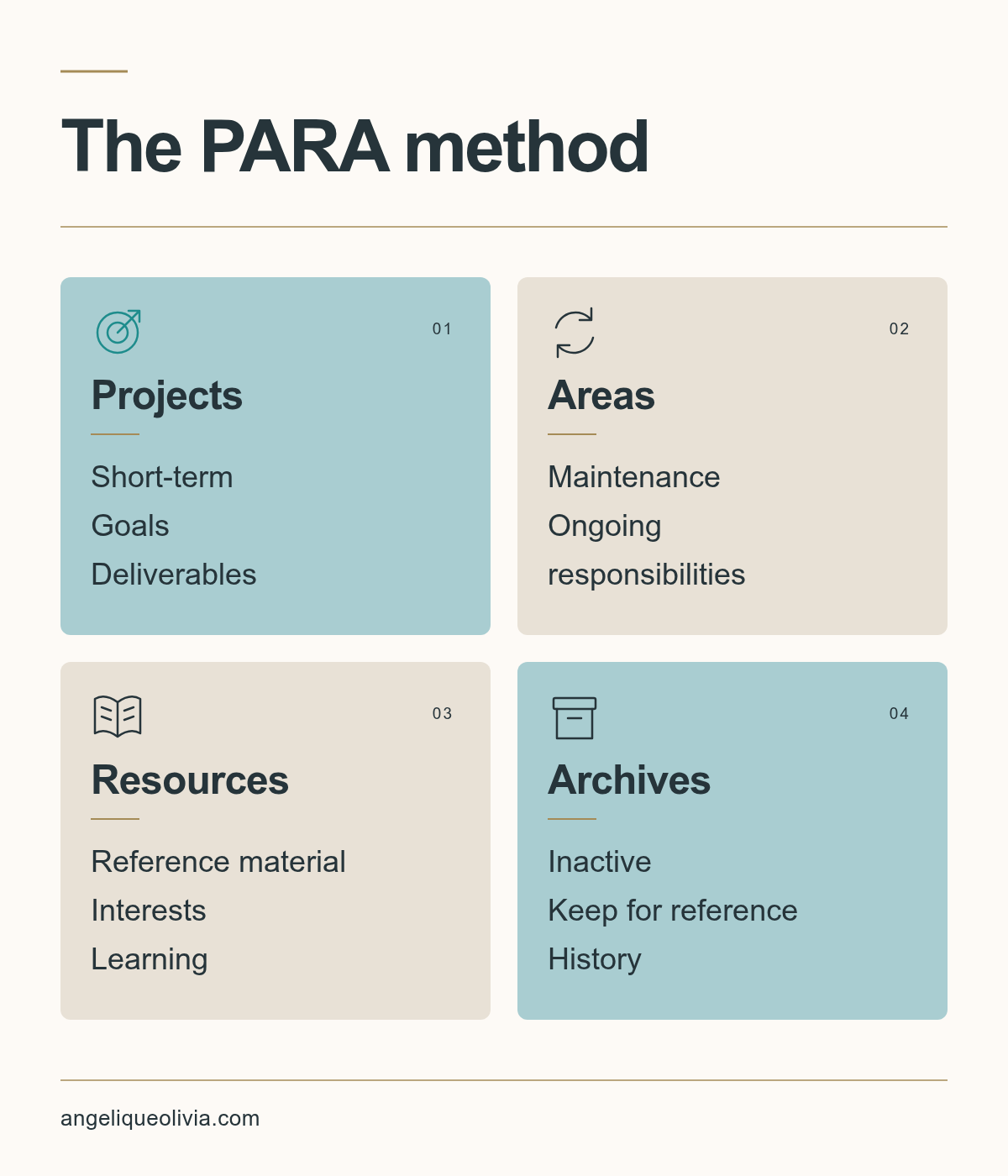
1) Projects
What you're working on right now. They bring together your active tasks and the goals you're aiming for.
2) Areas
The professional or personal areas of your life you're responsible for (home insurance, finances, etc.).
3) Resources
Everything that supports your activities and your ability to complete your projects.
4) Archives
Everything that isn't active for now and that you can put out of your mind.
To know what's active without feeling guilty, I keep a very simple working rule:
- If you can name a goal and a deadline, it's a project.
- If you can name a routine and a vision, it's an area.
- If you know you'll use it in the near future, it's a resource.
- Otherwise, it goes to the archives… or it goes, full stop.
In my daily life, the most cluttered folder was the one where I mixed areas and resources: it quickly turned into a dumping ground for "maybe" files that I didn't use as much as I should have.
Example: my OneDrive
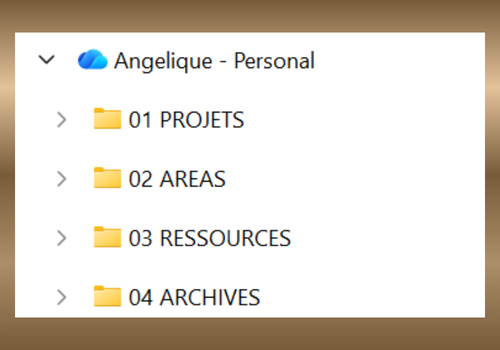
The first step is extremely simple: create four folders.
Here's a screenshot of the main folders in my own OneDrive when it was organised with PARA:
Workflow (the logic behind it)
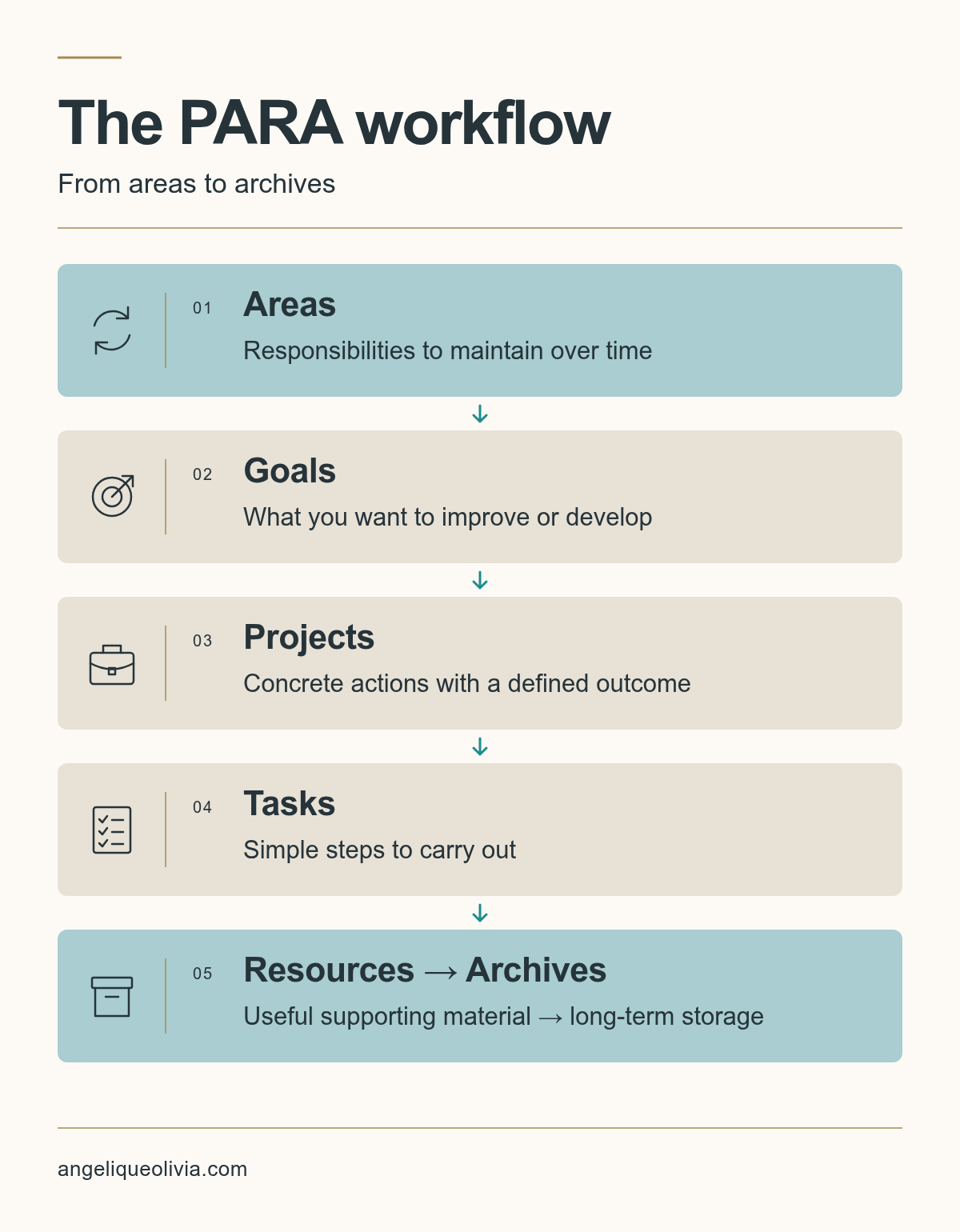
In terms of workflow, all you need to do is:
- Define your areas.
- Set goals for maintenance or growth.
- Reach them through projects made up of tasks.
- Use resources as support.
- Move reference documents to the archives once they're no longer active.
For me, the most decisive step is defining your areas: that's where everything is decided, and it's also the step that connects KonMari with my own system.
In fact, it all comes back to the vision of an ideal life.
Strengths and weaknesses
Strengths
- Minimalist
- Actionable (action-oriented)
- Can be split into subcategories adapted to each user's life
Weaknesses
- No longer suits Notion workspaces that have become too complex
- Requires constant upkeep to move and archive files
→ If you want to clear the undergrowth of your personal organisation quickly, set up your main storage system with the PARA method. It's a good way to take things back in hand before tackling the classification system I'm building.
To go further, here's Tiago Forte's official page on PARA.
Conclusion: choose your level of structure (and stick to it)
If I had to sum up: start by making room, then choose a classification system that fits your reality.
KonMari is perfect for keeping your home in order.
Johnny Decimal is powerful if you love structure and naming schemes.
PARA is formidable if you want to get back to basics and rely on action.
What matters isn't finding the best method, but picturing your dream life and creating routines that carry you even when your energy or focus is low.
If organisation plays such a big role in my life, it's also because it feeds my work. My work on classification systems helps me design clear workflows in my daily life as a translator specialising in culture and literature: preparing a project, organising my resources, following each step through to delivery. I'm now developing these skills further with TranslaStars' Master in AI and Innovation for Localization, which I'm currently taking.

Angélique Olivia MoreauLinguist and translator based in Bergen, Norway — building bridges between languages, culture and the way we organise our lives.